


X Saver:Download Twitter Video
4.73.91K Reviews
App Specs
- Version
- 2.8.0
- Updated On
- License
- Free
- Downloads
- 5,000,000+
- Developer
- Shotcut Video Workshop
- Categories
- Video Players & Editors
- Platform
- Android, iOS
Screenshots


 Analysis by AppCompare
I’d think of X Saver: Download Twitter Video as a focused tool for one particular job: keeping a video from Twitter available on my device instead of relying on a post remaining easy to find. That narrow purpose can be genuinely handy, but it also sets a fair expectation. This is a video-saving app, not a general-purpose editor or a replacement for browsing Twitter. If saving clips is an occasional need, the main question is whether its direct workflow is worth adding another app to your phone.
What the price tells me—and what it doesn’t
The app is free to install, while optional in-app purchases range from $0.99 to $29.99 per item. That makes it possible to try the basic experience without paying up front. I would not assume that every tool or convenience is included at no cost, though: the purchase range alone doesn’t explain what each item unlocks. Before buying anything, I’d check the purchase screen and decide whether the specific option solves a problem I actually have.
That distinction matters because a free download is not the same as a promise that every part of the experience is free. If all I need is an occasional saved clip, I can start without committing money. If I use it often, I’d judge any paid option by a practical test: does it make saving or managing videos noticeably easier for my routine? I wouldn’t pay simply because an upgrade is offered.
A small tool for a clear job
As an app in the video players and editors space, this one is best judged by how well it fits around the moment I find something worth keeping. Its stated purpose is saving Twitter videos, so the appeal is straightforward: move a clip out of a fast-moving feed and make it easier to revisit later. That can be useful for a tutorial I want to follow again, a visual reference for a project, or a funny clip I want to show someone without hunting through old posts.
The developer is Shotcut Video Workshop. The app has a 4.7 average from around 208,000 ratings, and it has passed 5 million installs. Those figures suggest that many people are interested in this kind of focused downloader, but popularity doesn’t settle whether it suits my habits. I’d still weigh the simple purpose against the extra storage, steps, and attention any separate utility app brings.
Age-wise, it is rated Everyone, which makes the app broadly accessible. That rating is about the app’s content classification, not a reason to ignore the context of videos saved from social media. I’d still use ordinary care when sharing someone else’s clip, and I’d keep personal copies for reference rather than treating a download as permission to repost someone’s work.
Where the convenience pays off
The biggest value for me is not a long list of editing controls; it is reducing the chance that a useful clip disappears into the endless scroll. A saved video is easier to revisit when I’m offline or when the original post has moved out of sight, subject to how the app and source handle that particular video. That makes the app more compelling for people who collect visual references or regularly return to clips than for someone who only saves something once in a while.
Worth Reading Before You Choose

EA SPORTS FC Mobile 26 Is a Bigger Football Game, but It Takes Time

Flipboard Shows What News Apps Must Do Beyond the Feed

Switching to Android Auto Means Rethinking Your Driving Routine

Google Calendar Makes a Crowded Week Easier to Manage

Ludo King Makes the Most of the Minutes Between Plans

Baby Panda World Brings Quick Play to Modern Phones, but Its Game Library Feels Busy
A practical habit helps: after saving a clip, give it a moment of attention and decide whether I truly need to keep it. Video files can accumulate, and a downloader can turn a tidy phone into a cluttered one if I never review the results. I’d also consider saving only material I have a clear reason to revisit. That keeps the app useful rather than making it another folder of forgotten downloads.
My verdict on its value
For someone who frequently wants Twitter videos on hand, X Saver: Download Twitter Video looks like a reasonable free starting point, with optional purchases to consider only if their purpose fits. For a casual user, the benefit may be too small to justify installing a dedicated app; using the social app to find posts again may be enough. I’d try the no-cost route first, keep expectations focused on downloading, and skip any purchase unless it clearly improves a repeated task.
Overall, I see the strongest case for people who want a simple way to keep selected clips accessible, not for users looking for a full editing suite or a universal media library. The right choice depends on frequency: regular savers may appreciate a dedicated shortcut, while occasional viewers can probably do without it. That makes this a practical, limited-purpose utility rather than an essential app for every phone.
Ever stumbled upon a hilarious or inspiring video on Twitter and wished you could save it for later? Well, I’ve got just the app for you! Let me introduce you to X Saver: Download Twitter Video. This nifty little tool has made video saving a breeze, and I’m here to spill all the details about how it works and why it might become your new favorite app.
Getting Started with X Saver
First things first, downloading and setting up X Saver: Download Twitter Video is as easy as pie. Just head over to the Google Play Store or Apple App Store, hit download, and you’re ready to roll. The app’s interface is clean and straightforward, which means no time wasted figuring out how everything works. Trust me, even if you’re not the most tech-savvy person, you’ll have no problem navigating this app.
How It Works
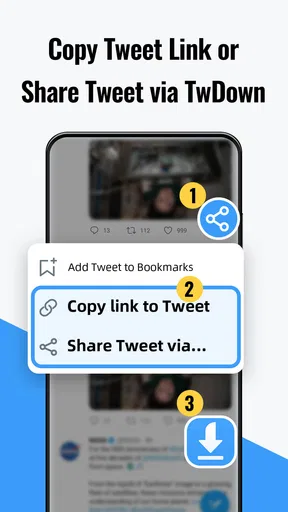
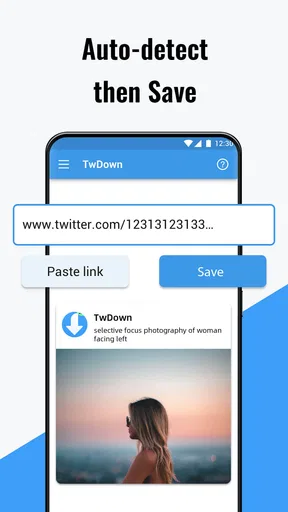
So, how do you actually save videos with this app? It’s simple! While scrolling through Twitter, if you spot a video you love, all you need to do is copy the tweet’s link. Open the X Saver app, and paste the link into the designated box. With a single tap, the video is downloaded straight to your device. It’s like magic! No more screenshotting and hoping to find the video again later.
What I really like is how fast the app processes downloads. I’ve had other apps that took forever to save just one clip, but here, it’s all done in seconds. Plus, the quality of the videos is top-notch. You get to keep every giggle-inducing or awe-inspiring moment in the same quality as you saw it on Twitter.
Features That Make a Difference
Now, let’s talk about some standout features that make this app a must-have. For one, it supports multiple video formats. Whether it’s an MP4, GIF, or any other format, X Saver handles it like a champ. And, if you’re someone who loves to organize your media, you’ll appreciate the app’s download manager. It lets you categorize and keep track of all your saved videos effortlessly.
Another neat feature is the built-in video player. You can watch your saved videos directly within the app without switching to another player. It’s a small touch, but it adds to the overall convenience and user experience.
Why You’ll Love It
What really sets X Saver apart is its ease of use and reliability. I’ve used apps before that promised the same functionality but came with a bunch of bugs and crashes. Not this one! It’s smooth sailing all the way. Plus, it’s completely free. There are no hidden fees or annoying ads popping up every two seconds. Just pure, uninterrupted downloading fun.
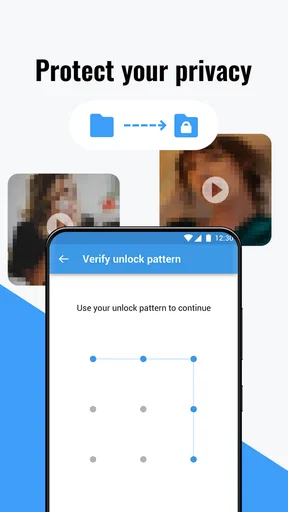
And let’s not forget about privacy. The app doesn’t require any unnecessary permissions, which is a huge plus. Your data stays safe, and you can enjoy saving videos without any worries.
Final Thoughts
In a nutshell, X Saver: Download Twitter Video is a fantastic tool for anyone who loves spending time on Twitter and wants to keep their favorite videos handy. It’s fast, efficient, and incredibly user-friendly. Honestly, after using it for a while, I can’t imagine my social media experience without it.
If you’re ready to elevate your Twitter game, give X Saver a try. You’ll be downloading videos like a pro in no time. And who knows, maybe you’ll even become the go-to person in your friend group for video-sharing tips!
Pros
- Easy-to-use interface for all users.
- Fast download speeds for videos.
- Supports multiple media formats.
- No registration required to use.
- Lightweight and doesn't drain battery.
Cons
- Contains ads that can be intrusive.
- Limited features in the free version.
- Requires internet connection to function.
- Occasional bugs with large files.
- No built-in media player for previews.
FAQs for X Saver:Download Twitter Video
What is X Saver: Download Twitter Video?
X Saver: Download Twitter Video is an app designed to help users download videos from Twitter directly to their devices. It allows for easy saving and offline viewing of your favorite Twitter content. With a user-friendly interface, it simplifies the process of grabbing videos and GIFs from tweets.
Is X Saver: Download Twitter Video free to use?
Yes, X Saver is available for free. However, it may offer in-app purchases or ads to support its functionality. Users can access basic features without any cost, but there might be premium options that enhance the app’s capabilities or user experience.
How do I download a video using X Saver?
To download a video, copy the tweet link containing the video you want to save and paste it into the app. X Saver will process the link and provide download options in various resolutions. Choose your preferred quality and save the video to your device’s storage.
Is X Saver secure and legal to use?
X Saver is generally considered secure, but users should download the app from trusted sources like the Google Play Store or Apple App Store. Regarding legality, downloading videos may violate Twitter's terms of service, so it's important to use the app responsibly and for personal use only.
What devices and platforms support X Saver?
X Saver is available for both Android and iOS devices. It requires a compatible smartphone or tablet with a stable internet connection. Users should ensure their device meets the app’s minimum system requirements for optimal performance and functionality.


